Choosing the right Customer Relationship Management (CRM) platform used to feel like a chore reserved for enterprise giants with deep pockets and dedicated IT teams. That time is long gone. In 2026, the best CRM software for small businesses is not about complex customization; it is about intuitive design, automation that actually saves time, and a price point that does not make your accountant wince. The reality is that your customer data is scattered across your inbox, your spreadsheets, and your phone. A modern CRM brings that chaos into one clear, actionable hub.
However, the market is saturated. Every vendor claims to be “easy to use” and “perfect for teams,” which makes the research process exhausting. If you pick wrong, you are not just wasting money—you are burdening your team with a tool they will refuse to use. This guide cuts through the noise. We are focusing strictly on solutions that offer the best balance of functionality, scalability, and support for small operations. We have evaluated these tools based on real-world usability, pricing transparency, and the specific pain points that plague small business owners, from managing follow-ups to tracking deals through a messy pipeline.
By the end of this guide, you will have a clear understanding of what features actually matter in 2026, which platforms offer the most value for a limited budget, and how to avoid the common pitfalls of over-buying software. Whether you are a solo freelancer juggling proposals or a growing team of twenty looking to standardize your sales process, there is a tailored solution here for you. Let’s find the perfect fit for your business so you can spend less time typing and more time selling.
What Small Businesses Actually Need from a CRM in 2026
Before diving into the specific platforms, it is vital to understand the shift in what makes a CRM “best.” In past years, the goal was simple: store names and numbers. Today, that is table stakes. The winning platforms are those that use artificial intelligence to remove busywork. But for a small business, the most important feature is still the one you will actually use daily. If the interface feels clunky, adoption rates will plummet, and you will be back to your spreadsheets within a month.
You should look for a few non-negotiable pillars when comparing software:
- Lead Capture Automation: The software should automatically grab leads from your website forms, social media, and email signatures without manual data entry.
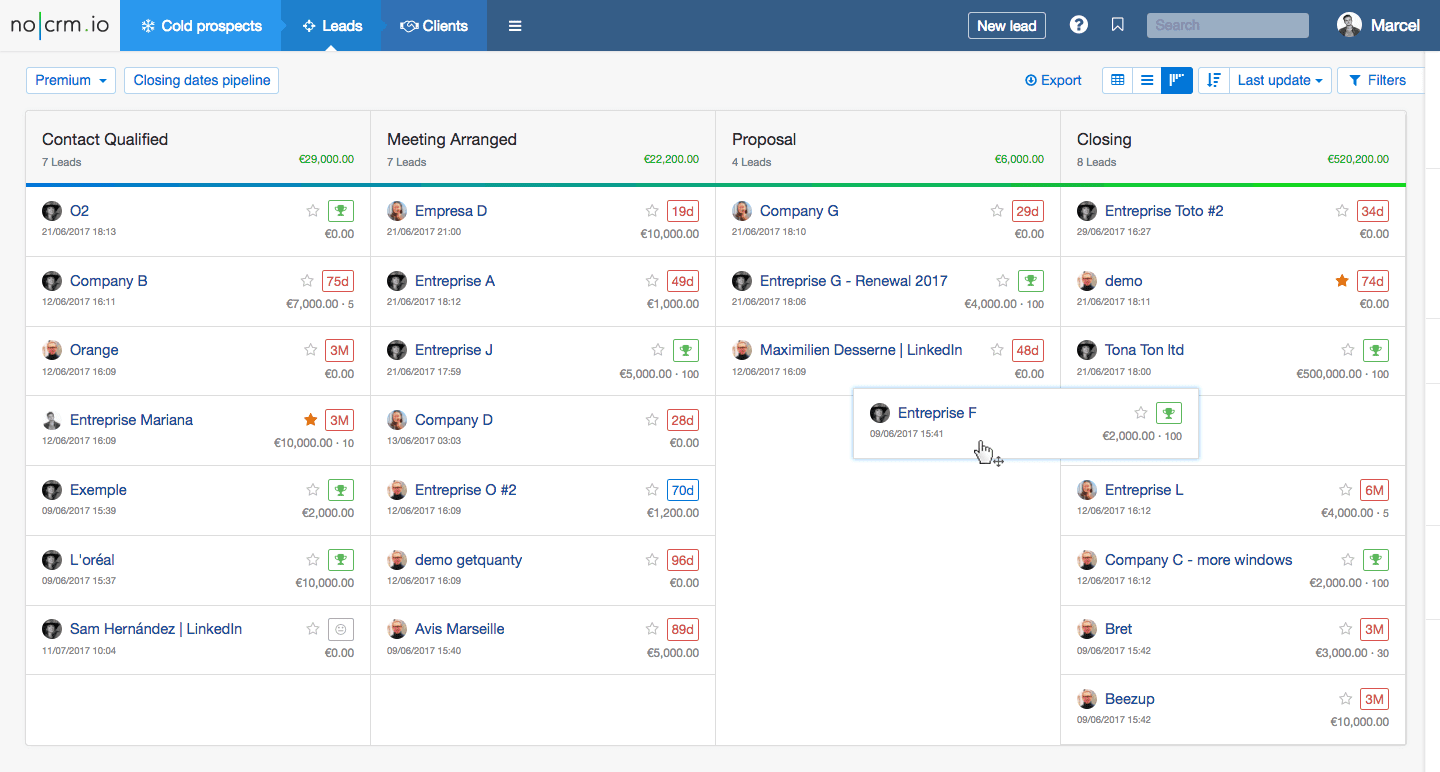
- Pipeline Visualization: A simple drag-and-drop Kanban view is essential. You need to see exactly where every deal stands at a glance, without running complex reports.
- Email Integration: It must sync flawlessly with your existing email client (Gmail or Outlook) so that every conversation is logged automatically.
- Scalability: The tool should allow you to add users or features as you grow, without forcing you to upgrade your plan entirely.
Finally, do not underestimate the importance of mobile functionality. In 2026, your team is likely on the move. The best small business CRMs offer a mobile app that feels just as good as the desktop version, allowing you to update deals from a trade show floor or reply to a client while waiting for coffee.
The Top Contenders: A Detailed Breakdown
This year, the market has split into two distinct categories: all-in-one sales hubs for aggressive growth and simplified relationship managers for service-based businesses. We have selected five platforms that represent the pinnacle of value and performance for small teams. Each of these has been tested for usability, support quality, and return on investment.
1. HubSpot CRM: The Best for Free-Tier Power
HubSpot remains the undisputed champion for small businesses that want a professional-grade tool without the upfront cost. The free version is not a useless trial; it is a fully functional CRM that includes contact management, deal tracking, and email templates. In 2026, they have made significant strides in their AI assistant, which helps draft personalized emails based on the contact’s history.
However, it is not perfect. While the free plan is generous, the costs can climb rapidly if you decide to add marketing automation or advanced reporting. For a small business that is just starting to get organized, though, this is often the safest bet. The user interface is incredibly forgiving, and there are thousands of tutorials available if you get stuck.
2. Pipedrive: The Sales-Focused Simplicity
If your business lives and dies by the sales pipeline, Pipedrive is built specifically for you. Unlike HubSpot, which can sometimes feel broad, Pipedrive focuses intensely on the activities that drive revenue. The interface is built around the “actions” of selling—calls, emails, and meetings. It is renowned for its simplicity, making it one of the best CRM software for small businesses in 2026 that do not have time for a steep learning curve.
Pipedrive excels at automation. You can set up workflows that automatically move deals forward based on specific triggers, such as opening an email or visiting a pricing page. It is less cluttered than competitors, which means your team will spend less time clicking around and more time dialing. The downside is that its contact management features are slightly less robust than others; it is a sales tool first, not a customer service platform.
3. Zoho CRM: The Ultimate Customization for a Low Cost
Zoho is the Swiss Army knife of the CRM world. It offers a staggering amount of customization for a price that undercuts almost everyone else. For small businesses with unique workflows—perhaps you are a boutique agency or a niche manufacturer—Zoho allows you to create custom modules, fields, and layouts that fit your exact process. It is the best option if you find off-the-shelf CRMs too restrictive.
That power comes with a caveat: the learning curve is steeper. The interface is feature-rich, which can feel overwhelming at first glance. However, Zoho has invested heavily in its user experience, and the 2026 version is cleaner than ever. If you are willing to spend a weekend setting it up, Zoho offers the highest return on investment for budget-conscious owners who need specific workflows.
4. Monday.com: The Visual Project Management Crossover
While many CRMs are built for sales teams, Monday.com is built for the entire business. It is technically a Work OS, but its CRM capabilities have matured significantly. For small businesses that need to track not just deals but also the implementation of those deals, Monday.com is a game-changer. You can move a lead from a sales pipeline directly into a project plan for delivery, all in one place.
This is the best option for service-based businesses that need to align sales and operations. The visual interface is stunning and extremely intuitive—most teams can start using it within minutes. However, the reporting dashboard can become limited on lower tiers, and the per-user cost can get high if you need the premium automation features.
5. Freshsales: The AI-Powered All-Rounder
Freshsales, part of the Freshworks suite, is making waves in 2026 for its built-in AI capabilities that don’t require an expensive add-on. Unlike other platforms where AI is a premium feature, Freshsales includes an AI assistant that scores leads, suggests next steps, and even analyzes emails for sentiment. For a small sales team, this is like having a virtual sales manager guiding you.
It offers excellent value, combining the contact management of HubSpot with the pipeline focus of Pipedrive. The built-in phone and email capabilities are robust, and the user experience is smooth. The main drawback is that if you want to integrate with third-party apps, you might find the library smaller than Zoho or HubSpot’s marketplace.
Free vs. Paid: What is the Real Cost?
There is a constant temptation to choose the $0 plan, and for many micro-businesses, that is the right move. However, you need to understand the economics of free CRM software. In 2026, the “freemium” models have become more generous in data storage but more restrictive in automation. You might find yourself manually performing tasks that a paid plan would automate instantly.
Here is a breakdown of when to make the leap to a paid plan:
- You are losing leads: If your free plan does not allow for email tracking, you are losing money on unanswered emails.
- You need multiple pipelines: Most free plans only offer one sales pipeline. If you sell different products to different markets, you need multiple.
- Reporting is holding you back: If you cannot generate a simple report to see your conversion rate, you cannot make data-driven decisions.
Generally, paid plans for these tools range from $15 to $50 per user per month. If a CRM helps you close just one extra deal per year, it has paid for itself many times over. Do not look at it as an expense, but as a revenue tool.
Implementation Tips: Ensuring User Adoption
You have selected the software, but the journey is just beginning. The sad truth is that over 70% of CRM implementations fail because of user adoption. Your team will resist if they feel the tool is a “tracking” mechanism for management. To succeed, you must frame it as a tool for them, not on them.
Start by importing your data cleanly. Garbage in, garbage out—if your spreadsheet is full of duplicates, the CRM will be too. Spend an afternoon cleaning your contact list before you migrate. Next, automate one simple task immediately. Choose a repetitive action, like assigning leads to specific sales reps based on region, and let the software handle it. When your team sees that the computer is doing the boring work, they will buy in.
Finally, provide continuous training. Do not just send a link to a help article. Host a lunch-and-learn, walk them through a mock deal, and show them how to use the mobile app for quick updates. Celebrate wins that come directly from the CRM—like a follow-up email sent on time that sealed a deal. Make it a habit, not a chore.
Conclusion
Selecting the best CRM software for small businesses in 2026 ultimately comes down to matching the tool to your team’s specific habits and your business goals. There is no single “best” tool—only the best fit for your workflow. HubSpot remains the safe, powerful choice for those who want a robust free plan. Pipedrive offers the cleanest interface for pure sales management, while Zoho provides the ultimate flexibility for complex needs.
Take advantage of free trials and test the software with real data before committing. Involve your sales team in the decision-making process, because they are the ones who will be using it daily. The right CRM is not just about storing data; it is about building stronger relationships, streamlining your processes, and giving your business the structure it needs to scale. Start your trial today, and watch your productivity—and your revenue—grow.
Frequently Asked Questions (FAQ)
How much should a small business expect to pay for a good CRM in 2026?
Most reputable small business CRMs range from $15 to $50 per user per month for paid plans. However, many platforms like HubSpot and Zoho offer robust free tiers that are sufficient for businesses with very basic needs or teams of up to two users.
Can I migrate my contacts from an Excel spreadsheet to a CRM?
Absolutely. All major CRM platforms offer built-in CSV import tools that map your spreadsheet columns to CRM fields. It is recommended to clean your data first by removing duplicates and standardizing formats for a smoother migration.
What is the most important feature to look for in a small business CRM?
Email integration is arguably the most critical feature. Being able to track when a lead opens your email or clicks a link directly within the CRM saves hours of manual logging and ensures no follow-up slips through the cracks.
Is it better to use a standalone CRM or one that includes project management?
It depends on your business model. If you are a service business that needs to track delivery after the sale, an all-in-one tool like Monday.com is beneficial. If you only need to track the sales cycle, a dedicated CRM like Pipedrive keeps things simpler and less cluttered.
How long does it take to implement a CRM for a small team?
With a modern, user-friendly tool, you can have the system set up and your team trained in under a week. However, full adoption and seeing significant ROI typically takes about one to two months as your team integrates it into their daily routine.
Will a CRM help me with email marketing campaigns?
Yes, most CRMs offer basic email marketing features like templates and list segmentation. For more advanced campaigns, you might need to integrate with a dedicated email marketing tool, though many CRMs now include these capabilities in their higher-tier plans.