Imagine walking into your favorite coffee shop, and the barista already knows your order, your name, and that you prefer oat milk on Tuesdays. That effortless, personalized experience is exactly what a great Customer Relationship Management system, or CRM, does for your business at scale. It is far more than just a digital address book or a database of emails. It is a strategic approach that centralizes all your customer interactions, streamlines your processes, and ultimately builds a bridge between your company and the people who keep it running.
However, a common misconception is that a CRM is just a piece of software. In reality, the software is simply the vehicle. The true definition of CRM is a holistic business strategy designed to improve profitability, retention, and customer satisfaction. It involves using technology to organize, automate, and synchronize every touchpoint—from the first marketing email to the final support ticket. Whether you are a solo entrepreneur or a large enterprise, understanding the mechanics of this strategy is no longer optional; it is the foundation for sustainable growth in a hyper-competitive market.
In this complete guide, we will strip away the jargon and look at what CRM really means. We will explore the core components, the tangible benefits you can expect, and the practical steps to implement a system that actually works for your team. By the end, you will have a clear roadmap to turn casual buyers into loyal advocates and ensure your business remains relevant, responsive, and ready for whatever comes next.
Understanding the Core of CRM
At its most basic level, a CRM is a centralized hub that stores every piece of information related to your customers and prospects. This goes beyond just names and phone numbers. It includes purchase history, communication preferences, website behavior, and even customer service interactions. Think of it as the central nervous system of your organization, connecting the marketing department, the sales team, and the support staff with one single source of truth.
The Three Pillars: Sales, Marketing, and Service
To truly grasp what is CRM in practice, you need to look at the three operational pillars it supports. These are not isolated islands; they work together to create a seamless customer journey.
- Sales Force Automation (SFA): This tracks every lead and opportunity through the pipeline. It automates follow-up emails, schedules tasks, and forecasts revenue, ensuring that no deal falls through the cracks because a rep forgot to call back.
- Marketing Automation: This pillar allows you to segment your audience based on specific criteria and nurture them with targeted campaigns. Instead of blasting everyone with the same message, you can send a personalized offer to a user who abandoned their cart or a case study to a prospect who downloaded a white paper.
- Customer Service and Support: This provides your team with a complete history of the customer’s issues and resolutions. When a customer calls for support, the agent doesn’t ask them to repeat themselves; they already know the history, which drastically improves resolution times and satisfaction.
Data Centralization: Why It Matters
Before CRM, data lived in silos: sales had spreadsheets, marketing had email tools, and support had ticketing systems. This fragmentation creates chaos and missed opportunities. A CRM breaks down these silos. When a customer interacts with your brand on social media, updates their billing info, or opens a specific email, that information is instantly available to everyone. This 360-degree view of the customer is the single most valuable asset your business can possess, as it allows for proactive, rather than reactive, decision-making.
The Tangible Benefits of Using a CRM
Investing in a CRM is not just about staying organized; it is about driving real, measurable business outcomes. While the initial setup requires effort, the return on investment often manifests in ways that directly impact your bottom line. Here are the most significant advantages you can expect to see once the system is fully integrated into your daily workflow.
Enhanced Customer Retention and Loyalty
Acquiring a new customer can cost five times more than retaining an existing one. A CRM helps you retain customers by making them feel valued. By tracking their purchase history and past interactions, you can anticipate their needs. For example, if a customer buys a new laptop, the CRM can remind you to send them a follow-up email about a compatible accessory a week later. This level of attentiveness builds trust and encourages repeat business, turning a one-time transaction into a long-term relationship.
Improved Time Management and Efficiency
Without a CRM, your team spends countless hours on administrative tasks: searching for emails, manually entering data, and updating spreadsheets. A CRM automates these mundane tasks. It can automatically log calls, schedule meetings, and update records. This frees up your sales team to do what they do best: sell. Studies have shown that sales reps spend only about a third of their day actually selling; a CRM can push that number significantly higher by eliminating the busywork.
Data-Driven Decision Making
Gut feelings are great for choosing a restaurant, but they shouldn’t be the foundation of your business strategy. A CRM provides a wealth of data and analytics. You can see which marketing campaigns generate the most leads, which products are selling best in specific regions, and where your sales pipeline is getting stuck. These insights allow you to allocate resources effectively and pivot your strategy based on hard facts rather than intuition.
Choosing the Right CRM: Types and Features
The market is flooded with CRM options, from simple contact managers to complex enterprise platforms. Knowing which one is right for you depends on your business size, your industry, and your specific goals. Selecting the wrong one can lead to poor user adoption and wasted budget, so it is vital to understand the landscape before committing.
Cloud-Based vs. On-Premise
The most fundamental distinction is where the software lives. Cloud-based CRMs (like Salesforce, HubSpot, and Zoho) are hosted on the vendor’s servers and accessed via the internet. They are easy to set up, scalable, and accessible from anywhere in the world. On-premise CRMs require you to host the software on your own servers. While they offer more customization and data control, they require substantial upfront investment in hardware and IT staff to maintain. For most small to mid-sized businesses, the cloud is the more practical and cost-effective choice.
Operational vs. Analytical
Another way to categorize CRMs is by their primary function. Operational CRMs focus on automating the daily interactions—think sales automation and support ticketing. They are the workhorses of the front office. Analytical CRMs are designed to analyze customer data to find patterns and trends. They are less about day-to-day tasks and more about strategic insights, such as identifying which customer segments are most profitable or predicting churn risk. Many modern CRMs offer a blend of both, but it helps to know which side your business needs most.
Key Features to Look For
While the specific features will vary, there are several non-negotiables that every good CRM should include. Look for a user-friendly interface, extensive integration capabilities with your existing tools (like Gmail or Outlook), and robust reporting dashboards. Additionally, consider the level of customization available. Can you create custom fields for your specific industry? Can you automate complex workflows without needing a developer? Prioritize these features to ensure the software adapts to your business, rather than forcing your business to adapt to the software.
Implementing a CRM: Strategy and Best Practices
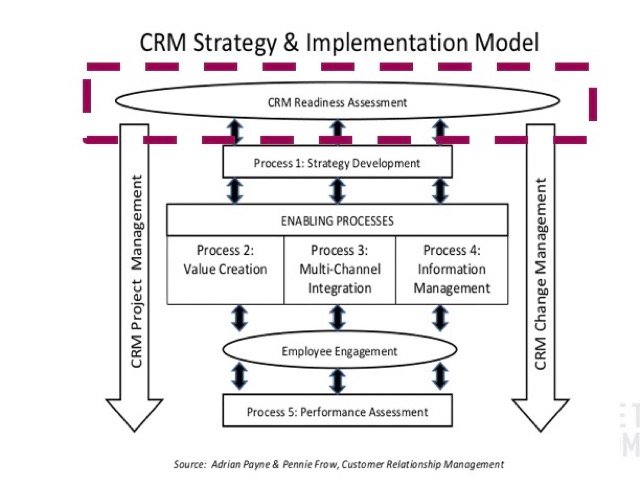
Buying a CRM is the easy part; getting your team to actually use it is the real challenge. A failed CRM implementation is almost always a human problem, not a technology problem. To ensure a smooth rollout, you need a clear strategy that focuses on people and processes as much as the software itself.
Start with Your Goals, Not the Software
Before you even start demoing software, write down what you want to achieve. Do you want to increase lead conversion rates by 20%? Do you want to reduce customer response times? Are you trying to get a better handle on your sales forecast? By defining your KPIs first, you can look for software that specifically addresses those needs. This prevents you from getting distracted by flashy features you will never use.
Clean Up Your Data First
Your new CRM is only as good as the data you put into it. If you import a massive spreadsheet full of duplicate contacts and outdated information, your new system will be a mess from day one. Take the time to scrub your data in advance. Deduplicate records, standardize naming conventions, and remove stale leads. This process might be tedious, but it is essential for ensuring your team trusts the data moving forward.
Invest in Training and Adoption
Your team will resist the new system if they feel it is a burden. To combat this, involve them in the selection process and explain the benefits for them, not just the company. Emphasize that it will reduce their manual data entry and help them close more deals. Provide comprehensive training that is tailored to different roles—sales reps don’t need to know how to build complex marketing reports. Finally, appoint a “CRM Champion” within each team who can offer ongoing support and answer questions. This encourages consistent use, which is the ultimate goal of any implementation strategy.
CRM Trends Shaping the Future
The world of customer relationship management is not static; it evolves rapidly alongside technological advancements. To stay ahead of the curve, you need to be aware of the trends that are shaping how businesses interact with their customers. The future is increasingly intelligent, automated, and personalized.
Artificial Intelligence and Predictive Analytics
Artificial Intelligence (AI) is no longer a futuristic concept; it is a present reality in most modern CRMs. AI can analyze vast amounts of historical data to predict future behaviors. For example, it can score leads based on their likelihood to convert, flag accounts that are at risk of churning, and even draft personalized email responses. This allows your team to prioritize their efforts on the activities that will yield the highest return, effectively working smarter, not harder.
Hyper-Personalization and the Customer Journey
Customers today expect omnichannel, personalized experiences. They might start a conversation on social media, switch to email, and finish with a phone call. A modern CRM tracks all of these touchpoints to create a continuous conversation. This enables hyper-personalization—delivering the right message, on the right channel, at the exact moment the customer is most receptive. This goes beyond using their first name in an email; it is about anticipating their needs and providing a seamless transition between channels, which drastically improves the overall customer experience.
Conclusion
So, what is CRM? It is a comprehensive business philosophy and strategy that places the customer at the very center of your operations. It is the technology that captures, organizes, and analyzes every interaction, and the process that uses this data to build stronger, more profitable relationships. It is the difference between selling a product and cultivating a loyal fanbase.
Ultimately, a CRM is not a magic bullet that works overnight. It is a long-term investment in the health of your business. By moving away from scattered spreadsheets and disjointed communication, you empower your team with the clarity and efficiency they need to succeed. Whether you are just starting to look at options or looking to optimize your current system, remember that the goal remains the same: to understand your customers better so you can serve them better. Start with a clear strategy, commit to the process, and let the technology work behind the scenes to drive sustainable, meaningful growth.
Frequently Asked Questions (FAQ)
What is the difference between a CRM and a database?
A database is just a storage place for raw information, while a CRM is a strategic tool that manages, tracks, and automates interactions with that data. A CRM uses the database to improve business processes, relationships, and sales, whereas a simple database lacks the workflow and automation capabilities to do so.
Is a CRM only useful for large enterprises, or can small businesses benefit too?
Small businesses can benefit immensely from a CRM. It helps them look professional, manage leads effectively, and retain customers without needing a massive team. Modern cloud-based CRMs are affordable and scalable, making them accessible and highly beneficial for freelancers and small startups looking to organize their growth.
How long does it take to implement a CRM system?
Implementation time varies widely based on complexity. A simple, out-of-the-box setup can be done in a few days, while a heavily customized enterprise solution can take several months. The bulk of the time is usually spent on data migration, user training, and integrating with existing software to ensure the team adopts it fully.
Will my sales team actually use a CRM if they are used to spreadsheets?
They will use it if it makes their job easier. The key is to choose a user-friendly interface and emphasize the benefits, such as automatic call logging and email tracking. If the system requires double data entry or feels like a chore, they will resist. Proper training and leadership buy-in are essential for adoption.
What are the first steps to choosing the right CRM software?
Start by defining your biggest pain points and must-have features. Get feedback from your sales, marketing, and support teams, as they will be the primary users. Always take advantage of free trials to test the user experience, and ensure the software integrates seamlessly with the tools you already use daily, like Gmail or Slack.